
Last updated on October 22nd, 2026 at 12:06 pm
The best practices for schema markup in legal directories start with matching the markup to the page: use CollectionPage and ItemList for category listings, LegalService for law firm profiles, and Person for individual attorneys.
Keep business details accurate, connect related records with stable IDs, and validate the final output.
What Can You Change on a Legal Directory?
If you run the directory: control the templates that generate category pages, firm listings, and attorney profiles. Generate JSON-LD from the same fields visitors see so changes to an address or employer update both the profile and its markup.
If you only manage your firm’s listing: correct its name, office address, phone, website, and attorney details through the directory’s available fields. The publisher controls its schema implementation. Adding JSON-LD to your own website does not change the directory’s markup, and a profile description is not the place to paste scripts.
Legal Directory 8-Point Schema Checklist
- Match the page’s purpose. A list of firms is a collection; an individual firm is a LegalService; a lawyer is a Person. The directory publisher is a separate organization.
- Describe visible listings. On a category page, the marked-up items and their order should match what visitors can see. Keep pagination and filtered results aligned with the page being described.
- Give each entity a stable @id. Reuse it wherever the directory references that firm or attorney. Use worksFor to connect a lawyer to the correct firm.
- Verify business details. Match the firm’s current name, address, phone, and website. Do not turn a service area into an invented office.
- Use sameAs selectively. Link only to pages that unambiguously identify that same firm or person, not category pages or unrelated websites.
- Keep ratings honest. Do not import stars from other websites or mark up a category as though it were a single reviewed business. Check Google’s review rules before adding ratings.
- Avoid duplicate output. Check the directory plugin, theme, and SEO plugin before adding custom schema. Extend the existing graph where possible.
- Test templates and live pages. Check a category, a firm, and an attorney profile, including profiles with missing optional fields. Retest after template or plugin changes.
Directory Category Example with ItemList
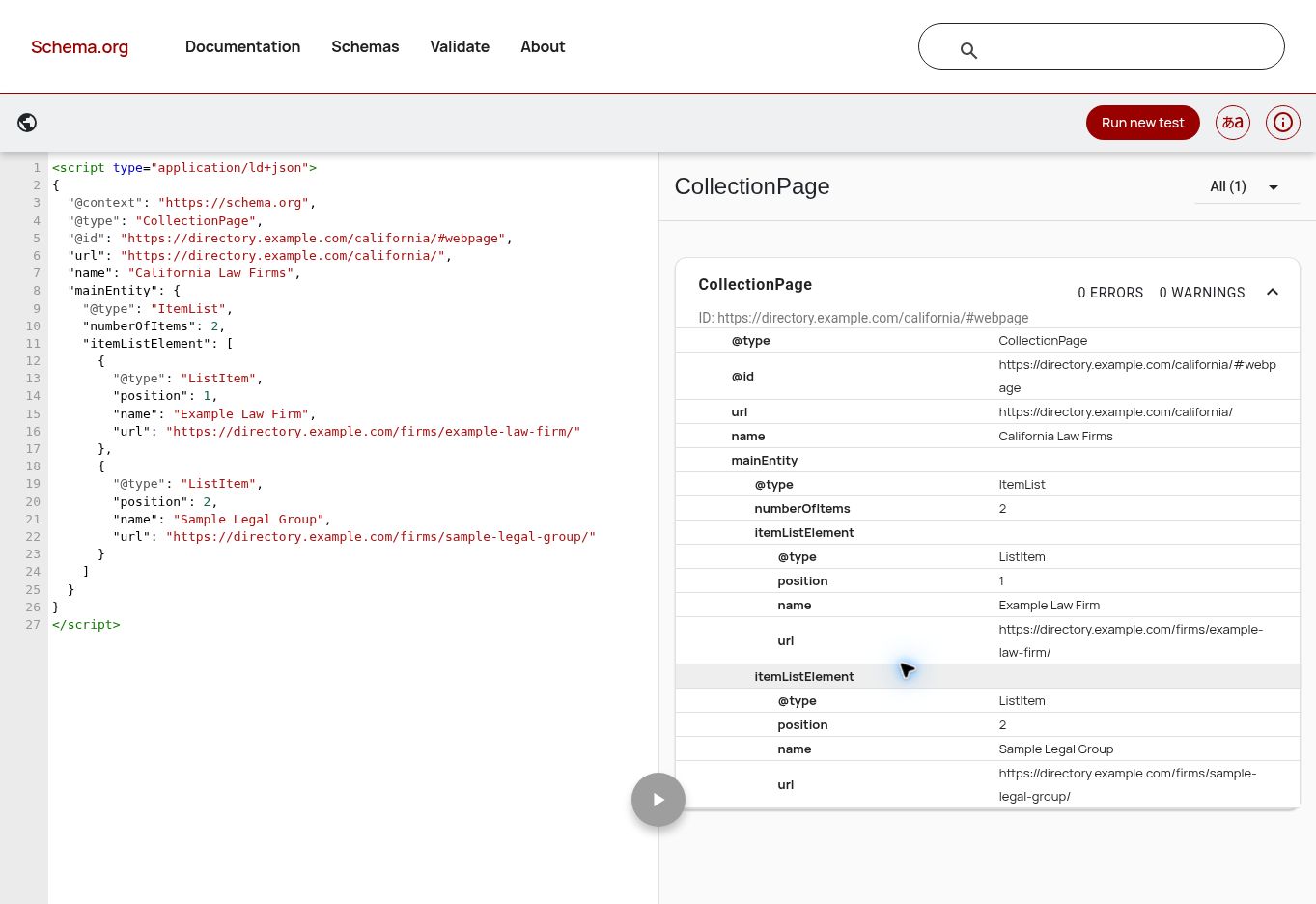
This fictional category contains two visible listings, Example Law Firm and Sample Legal Group, in that order. The code describes the category page and points to each firm’s directory profile. Replace all example names and URLs before using it.
View code
<script type="application/ld+json">
{
  "@context": "https://schema.org",
  "@type": "CollectionPage",
  "@id": "https://directory.example.com/california/#webpage",
  "url": "https://directory.example.com/california/",
  "name": "California Law Firms",
  "mainEntity": {
    "@type": "ItemList",
    "numberOfItems": 2,
    "itemListElement": [
      {
        "@type": "ListItem",
        "position": 1,
        "name": "Example Law Firm",
        "url": "https://directory.example.com/firms/example-law-firm/"
      },
      {
        "@type": "ListItem",
        "position": 2,
        "name": "Sample Legal Group",
        "url": "https://directory.example.com/firms/sample-legal-group/"
      }
    ]
  }
}
</script>
How to read it: CollectionPage identifies the category page. Its mainEntity is the ItemList; each ListItem supplies the visible listing’s position, name, and profile URL. numberOfItems is two because this example describes a two-item list. This markup alone does not qualify a legal directory for a Google carousel.
Law Firm Directory Profile Example
This fictional firm profile identifies Example Law Firm and displays the address and phone below. The WebPage URL belongs to the directory; the LegalService URL points to the firm’s own website. Its stable directory @id identifies the business record.
View code
<script type="application/ld+json">
{
  "@context": "https://schema.org",
  "@type": "WebPage",
  "url": "https://directory.example.com/firms/example-law-firm/",
  "name": "Example Law Firm Directory Profile",
  "mainEntity": {
    "@type": "LegalService",
    "@id": "https://directory.example.com/firms/example-law-firm/#firm",
    "name": "Example Law Firm",
    "url": "https://firm.example.com/",
    "telephone": "+1-415-555-0100",
    "address": {
      "@type": "PostalAddress",
      "streetAddress": "123 Example Street",
      "addressLocality": "San Francisco",
      "addressRegion": "CA",
      "postalCode": "94105",
      "addressCountry": "US"
    }
  }
}
</script>
Individual Attorney Directory Profile Example
This fictional profile describes Jane Example, an attorney at Example Law Firm. Use Person for the individual and worksFor for the employer connection. The names and relationship must be supported by the visible profile.
View code
<script type="application/ld+json">
{
  "@context": "https://schema.org",
  "@type": "WebPage",
  "url": "https://directory.example.com/attorneys/jane-example/",
  "name": "Jane Example Attorney Profile",
  "mainEntity": {
    "@type": "Person",
    "@id": "https://directory.example.com/attorneys/jane-example/#person",
    "name": "Jane Example",
    "jobTitle": "Attorney",
    "url": "https://firm.example.com/attorneys/jane-example/",
    "worksFor": {
      "@type": "LegalService",
      "@id": "https://directory.example.com/firms/example-law-firm/#firm",
      "name": "Example Law Firm"
    }
  }
}
</script>
Common Legal Directory Schema Mistakes
- Marking the directory itself as the law firm that provides every listed service.
- Using the deprecated Attorney business type for an individual lawyer.
- Copying the same firm, address, or rating onto every listing.
- Describing hidden listings or relationships the page does not establish.
- Assuming a valid schema test guarantees Google review stars or rankings.
For reviews, an independent directory may qualify for supported business review features when it meets Google’s requirements. Firm-controlled reviews on the firm’s own website are excluded from self-serving business review stars. Person is not a supported Google review-snippet type. See Google’s review snippet documentation.
Reference definitions: CollectionPage, ItemList, LegalService, and Person. Use the free law firm schema generator for a business or attorney starting point, then adapt it to your directory template. For related implementation issues, browse my WordPress and SEO troubleshooting guides.
Need schema implemented on your legal directory? Send me a category URL and a sample profile. I can review the existing output and help implement the right WordPress template changes. Request a directory schema review.
