
Last updated on October 16th, 2026 at 08:03 am
As of late 2026 the official WordPress Plugin Directory now includes more than 69,000 free plugins. After years of building, fixing, migrating, and optimizing WordPress websites, I’ve tested more plugins than I can remember. This is my practical list of the ones I actually use and recommend to clients, agencies, and developers.
My best WordPress plugins article published on LinkedIn in 2023 is still performing well, so I expanded it with my latest recommendations here. And each plugin listed has earned its place by solving a real problem without adding unnecessary bloat.
This list covers tools for specific jobs, not a checklist of plugins to install together. Choose one solution for each overlapping task, keep ongoing dependencies active, and remove temporary troubleshooting tools when the work is finished.
Makes useful articles easier to pass along through email, LinkedIn, WhatsApp and other sharing services. Standard buttons work well at the end of a guide, where readers have already received something worth sharing. Keep the selection focused on the channels your audience uses, and check mobile placement so floating buttons do not cover text or other controls. Sharing buttons make distribution easier; they do not create an audience by themselves. Learn more at AddToAny Share Buttons on WordPress.org.
- best for: Sharing guides and resources
- cost: Free
- keep active? Yes, while share buttons are displayed
Admin Columns
Freemium
Turns the WordPress post, page and media lists into more useful management screens. Displaying featured images, custom fields or taxonomy information in columns makes it easier to spot missing content without opening every entry. This is especially useful for directories and large content libraries. Choose columns that help you make decisions; adding every available field creates another cluttered dashboard. Advanced editing, filtering and sorting features depend on the paid version. Learn more at Admin Columns on WordPress.org.
- best for: Managing large content libraries
- cost: Free with a paid version
- keep active? Yes, while using custom admin columns
Advanced Custom Fields (ACF)
Freemium
Enables custom field creation for posts/pages, offering greater control over content. I use ACF when a website needs reusable information that should be entered consistently instead of manually formatted on every page. To learn more visit Advanced Custom Fields on wp.org.
- best for: Custom WordPress development
- cost: Free with a paid version
- keep active? Yes, when the website depends on it
Akismet – Spam Protection
Freemium Must Have
Checks comments and contact form submissions against a global database of spam to prevent your site from publishing malicious content. I use it on websites where comments or compatible forms attract significant spam, but I do not install it automatically when those features are not being used. To learn more visit Akismet Anti-Spam on wp.org.
- best for: Spam prevention
- cost: Free for qualifying personal use with paid commercial plans
- keep active? Yes, the longer its active the more it learns
All-in-One WP Migration (AIOWPM)
Freemium Must Have
Transfer your entire WordPress site with just a few clicks. I use this plugin strictly for quick incremental backups before I manipulate any files or plugin settings. For daily/automatic backups, however, they should be done server-side (within your hosting account) rather than rely on ANY plugin. Learn more at All-in-One WP Migration on wp.org.
- best for: Website migrations and incremental backups
- cost: Free with paid extensions
- keep active? Temporarily
Asset CleanUp – Page Speed Booster
Freemium Must Have
Improve loading times by disabling unnecessary CSS and JavaScript files. One of my most favorite plugins for decreasing HTTP requests by preventing page-specific styles and scripts from loading. Learn more at Asset CleanUp on wp.org.
- best for: Advanced performance cleanup
- cost: Free with a paid version
- keep active? Only when properly configured
Better Search Replace
Freemium Must Have
Easily update content in the database without SQL knowledge. I use the pro version because it shows exactly where queries are found before I choose to fix or replace any items such as links or even raw code within specific databases. Learn more at Better Search Replace on wp.org.
- best for: Database updates
- cost: Free with a paid version
- keep active? Temporarily
Broken Link Checker
Free
Automatically scans and alerts you of broken links and missing images. It can consume server resources, so I normally use it for a specific cleanup project instead of leaving it active indefinitely. Learn more at Broken Link Checker on wp.org.
- best for: Content audits
- cost: Free
- keep active? Temporarily
Bulk WP
Freemium
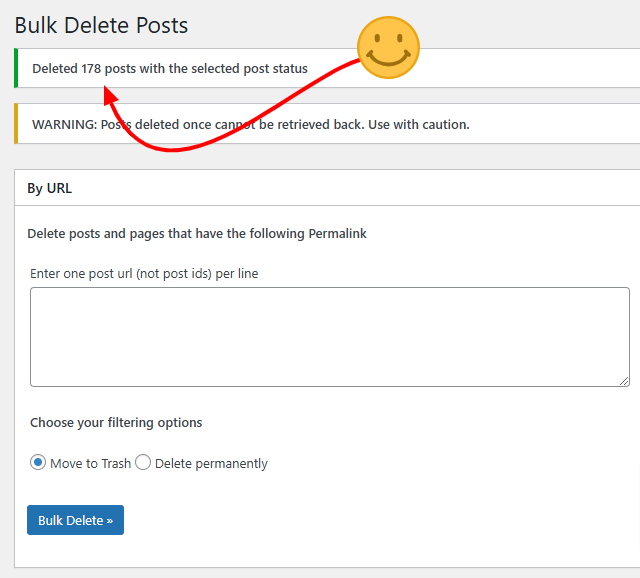
Removes posts, pages, attachments, users, meta and more using various filters and conditions. This free plugin has saved me so many hours, and clients so much money in maintenance costs. Bulk WP will be in my technical SEO toolkit moving forward. To learn more visit Bulk Delete on wp.org.
- best for: Removing specific files in bulk in seconds
- cost: Free with a paid version
- keep active? Temporarily
Call Now Button – Free Click to Call Button
Freemium
Places a big Call Now icon to the bottom of the mobile devices like cell phones and tablets. Because your mobile visitors probably have a phone in their hands this plugin will allow them to call you with one simple touch of the button. To learn more visit Call Now Button on wp.org.
- best for: Mobile lead generation
- cost: Free with paid options
- keep active? Yes, when calls matter
Change Text Case
Free
Adds simple controls for changing selected text between uppercase, lowercase, title case and other formats without manually retyping it. I use it when cleaning 100s of poorly formatted content, especially titles and headings copied from other sources.
From an SEO standpoint, it makes content cleanup so much easier and helps to maintain consistent HTML across larger websites. It won’t directly improve rankings of course, but it saves valuable time. Learn more at Change Text Case on wp.org.
- best for: Saving time with content formatting and cleanup
- cost: Free
- keep active? Optional
Classic Editor
Free
The Classic Editor plugin restores the classic post and page editor. My recommendation: use this one line of PHP instead if that is all you need.
add_filter( 'use_block_editor_for_post', '__return_false' );Add it as a PHP snippet in WPCode, set it to run everywhere, and activate it. Omit the opening PHP tag. Then deactivate Classic Editor and test. This replaces the basic editor switch, not the plugin’s per-user editor choices. WordPress filter reference.
Classic Widgets
Free
The Classic Widgets plugin restores the traditional Appearance > Widgets screen. My recommendation: use this one line of PHP instead if that is all you need.
add_filter( 'use_widgets_block_editor', '__return_false' );Add it as a PHP snippet in WPCode, set it to run everywhere, and activate it. Omit the opening PHP tag. Then deactivate Classic Widgets and test. For widget areas in classic themes; this does not change the Site Editor. WordPress filter reference.
CMS Tree Page View
Free
Your whole site, laid out as one clear tree. Drag a page to move it, click to edit, and shape your structure in seconds. To learn more visit CMS Tree Page View on wp.org.
- best for: Managing and reorganizing WordPress page hierarchy
- cost: Free
- keep active? Yes, if you regularly manage a large number of pages
Code Snippets
Freemium
Add custom PHP code to your WordPress site without editing core files. I use it for small customizations that do not justify creating a separate plugin. A broken PHP snippet can still cause serious problems, so test the code and keep a backup. To learn more visit Code Snippets on wp.org.
- best for: Small custom WordPress functions
- cost: Free with a paid version
- keep active? Yes, when snippets are in use
Column Shortcodes
Free
Easily add multi-column layouts to your pages and posts. I use it on older websites that need simple responsive columns without replacing the existing editor or theme. To learn more visit Column Shortcodes on wp.org.
- best for: Classic Editor layouts
- cost: Free
- keep active? When required
Duplicate Page
Free
Clone pages or posts quickly and easily. I use it when building groups of pages that share the same structure, such as service or location pages. Always replace duplicated titles, URLs, metadata and content before publishing. To learn more visit Duplicate Page on wp.org.
- best for: Faster page creation
- cost: Free
- keep active? Optional
Easy Table of Contents
Freemium
Builds a linked table of contents from the headings in your article. On a long plugin roundup or troubleshooting guide, readers can jump straight to the answer they need instead of scrolling through unrelated sections. Configure the heading levels carefully so the menu reflects the page structure, then check that anchor links land below any sticky header. A table of contents improves navigation; it does not fix vague headings or an unnecessarily long article. Learn more at Easy Table of Contents on WordPress.org.
- best for: Navigation within long articles
- cost: Free with a paid version
- keep active? Yes, while generated tables of contents are in use
Elementor – Website Builder
Freemium
Drag-and-drop page builder for creating professional WordPress designs. I use it when working on a website already built with Elementor. I do not add a page builder unless the project genuinely needs one because it becomes part of the website’s long-term infrastructure. To learn more visit Elementor on wp.org.
- best for: Visual page building
- cost: Free with a paid version
- keep active? Yes, when the website depends on it
Gravity Forms – Best Contact Form Plugin
Premium Must Have
Build professional contact forms, surveys, and more with advanced features. It is not the cheapest option, but it is dependable, flexible and well supported. To learn more visit gravityforms.com.
- best for: Professional lead-generation forms
- cost: Paid
- keep active? Yes
Imagify
Freemium
Compresses and resizes images and creates WebP or AVIF versions from the WordPress dashboard. It is useful when a growing media library contains oversized uploads that page caching cannot solve. Start with correctly sized source images, review a few optimized examples for visual quality, then process the rest of the library. Check how your theme and CDN serve the converted files before assuming every visitor receives the smaller format. Avoid overlapping image conversion settings in multiple plugins. Learn more at Imagify on WordPress.org.
- best for: Image compression and modern formats
- cost: Limited free allowance with paid plans
- keep active? Yes, for automatic optimization and format delivery
LiteSpeed Cache
Free
Combines performance settings with server-level page caching when the hosting environment supports it. Its general optimization tools work on other web servers, but the exclusive caching features require a compatible LiteSpeed environment or QUIC.cloud. Confirm the setup with your host before choosing it as your caching solution. Test forms, menus and checkout after changing script or CSS settings, and avoid running overlapping page-cache plugins together. Learn more at LiteSpeed Cache on WordPress.org.
- best for: Performance optimization on compatible hosting
- cost: Free plugin; some services may cost extra
- keep active? Yes, when it is the configured performance solution
Local Google Fonts
Free
Downloads supported Google Fonts and serves them from your own server, reducing font requests to Google. This can simplify font delivery on an older theme without changing the typography. Check the browser Network panel afterward because fonts loaded through unsupported methods may still make external requests. Prefer your theme’s native local-font option when available. At this update, the directory flags this plugin as untested with recent major WordPress releases, so check compatibility on staging before adding it to a new site. Learn more at Local Google Fonts on WordPress.org.
- best for: Local hosting of existing Google Fonts
- cost: Free
- keep active? Yes, unless font delivery is handled elsewhere
MapGeo – Interactive Geo Maps
Freemium
Add interactive and responsive maps to your WordPress site. I use it when location-based information needs to be more useful than a static image or basic embedded map. To learn more visit Interactive Geo Maps on wp.org.
- best for: Geographic and service-area content
- cost: Free with a paid version
- keep active? Yes, while active maps are published
Permalink Manager Lite
Freemium
Allows custom URL structures beyond the normal WordPress permalink controls. This can help when a migration needs to preserve existing URLs or a directory needs a different hierarchy from its internal content structure. Plan the final URLs before editing them, avoid duplicate paths, and verify redirects, canonicals and internal links after every change. Treat it as part of the site’s routing infrastructure: deactivating it can change which URLs resolve. Learn more at Permalink Manager Lite on WordPress.org.
- best for: Custom URLs and migration planning
- cost: Free with a paid version
- keep active? Yes, while custom permalinks depend on it
Popup Maker
Freemium
Create custom popups for lead generation, promotions, or announcements. I use it selectively. A useful popup can increase conversions, but an aggressive one can annoy visitors and hurt the experience. To learn more visit Popup Maker on wp.org.
- best for: Offers and lead capture
- cost: Free with paid extensions
- keep active? When needed
Query Monitor
Free
Shows database queries, PHP errors, HTTP API requests and other diagnostic information to help identify what is slowing down a WordPress request. It is particularly useful when the admin area feels slow and you need to find the responsible plugin, theme or external service. Compare representative pages and repeat the same action while investigating. Cached public pages may bypass the PHP work you are trying to measure, so interpret the results in context. Learn more at Query Monitor on WordPress.org.
- best for: Developer troubleshooting and performance diagnosis
- cost: Free
- keep active? Temporarily, while diagnosing an issue
Rank Math SEO
Freemium
Provides controls for SEO titles, meta descriptions, XML sitemaps and structured data in one interface. Its modular settings are useful when you want to enable only the tools a site needs. Configure indexing rules and templates before editing individual pages, then validate the rendered output. Choose either Rank Math or another full SEO suite rather than running both. A green optimization score is a checklist result, not evidence that a page will rank. Learn more at Rank Math SEO on WordPress.org.
- best for: Managing technical and on-page SEO
- cost: Free with paid plans
- keep active? Yes, when it manages the site’s SEO output
Redirection
Free Must Have
This is the only redirection plugin I recommend. I use it during redesigns, migrations and content consolidation projects where old URLs need to point somewhere useful. Agencies also prefer it because of its simple UI/UX and support. But if you’re comfortable editing the .htaccess file, that’s your best bet. To learn more visit Redirection on wp.org.
- best for: Redirects and 404 monitoring
- cost: Free
- keep active? Yes, but monitor it weekly then plan for removal after ~6 months
Regenerate Thumbnails
Free
Update image thumbnails to reflect new sizes or settings automatically. I normally use it during redesigns and migrations, then remove it when the job is finished. To learn more visit Regenerate Thumbnails on wp.org.
- best for: Image-size corrections
- cost: Free
- keep active? Temporarily
Relevanssi – A Better Search Plugin
Freemium
Improve WordPress search functionality for better results and user satisfaction. I use it on content-heavy websites where visitors need to search through many posts, pages or custom content types. To learn more visit Relevanssi on wp.org.
- best for: Internal website search
- cost: Free with a paid version
- keep active? Yes. The longer you use it, the more hyper-focused keyword data you’ll get, which is very valuable for SEO.
Shortcoder – Create Shortcodes for Anything
Freemium
Create reusable custom shortcodes for advanced functionality. It is useful when the same content needs to appear across multiple pages and be managed from one place. To learn more visit Shortcoder on wp.org.
- best for: Reusable content
- cost: Free or paid version
- keep active? Yes, when shortcodes are in use
Shortcodes Ultimate
Freemium
Adds ready-made content elements such as tabs, buttons and columns through shortcodes. It can extend a Classic Editor workflow without moving the entire site to a different builder. Use a small, consistent set of elements and check keyboard navigation and mobile behavior before publishing. Shortcodes remain a dependency: removing the plugin can leave visible shortcode text or missing content, so include those pages in any future redesign plan. Learn more at Shortcodes Ultimate on WordPress.org.
- best for: Content elements for Classic Editor websites
- cost: Free with paid add-ons
- keep active? Yes, while its shortcodes are published
Show Current Template
Free Must Have
See which template is being used on a page for easy debugging. It is a simple troubleshooting tool that saves time when working with unfamiliar or complicated themes. To learn more visit Show Current Template on wp.org.
- best for: Theme troubleshooting
- cost: Free
- keep active? Temporarily
Simple History – Track WordPress Changes
Freemium Must Have
Track all site changes to monitor updates and edits. I usually install this first on client websites because it helps answer one of the most important troubleshooting questions: what changed before the problem started? To learn more visit Simple History on wp.org.
- best for: Change tracking and troubleshooting
- cost: Free and pro version
- keep active? Yes
Simple Sitemap
Freemium
Creates a visible HTML sitemap that helps visitors browse published content. It can be useful on a growing resource site where important pages are difficult to find through the main menu. Select the content types and exclusions intentionally so utility pages do not overwhelm the list. This is different from the XML sitemap submitted to Search Console: an HTML sitemap helps people navigate, while an XML sitemap supports URL discovery by search engines. Learn more at Simple Sitemap on WordPress.org.
- best for: A browsable HTML sitemap
- cost: Free with a paid version
- keep active? Yes, while the sitemap depends on it
Site Kit by Google
Free
Brings data from services such as Search Console, Analytics, PageSpeed Insights and AdSense into the WordPress dashboard. It is a convenient overview for site owners who want to review traffic and search performance in one place. Check existing Analytics and Tag Manager installations before enabling new tracking so page views are not counted twice. Use the full Google service for detailed investigations, and configure consent where required rather than assuming the plugin handles every privacy decision. Learn more at Site Kit by Google on WordPress.org.
- best for: Google reporting inside WordPress
- cost: Free
- keep active? Yes, while using its reporting or tag placement
String Locator
Freemium Must Have
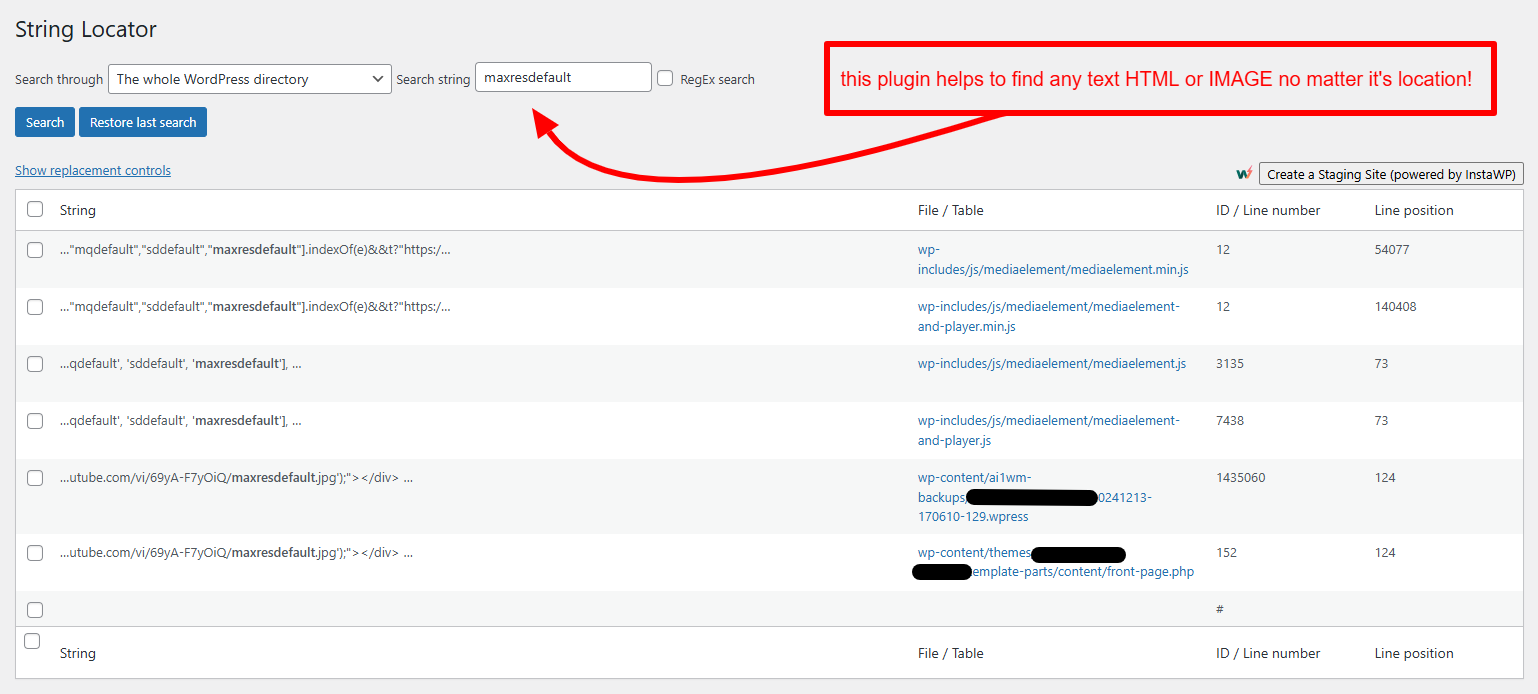
Quickly find and edit text strings in your WordPress files, themes, and plugins. Ideal for customizing or debugging code efficiently with a simple search interface. While auditing a local law firm site, I discovered this incredible tool and immediately paused my work to add this must-have plugin to the list. Learn more by visiting String Locator on wp.org.
- best for: Finding text or code inside WordPress themes, plugins and core files
- cost: Free
- keep active? No, activate only when needed
Web Accessibility by accessiBe
Premium
Connects WordPress to accessiBe’s accessWidget service, which offers visitor controls such as font and contrast adjustments alongside automated accessibility features. Evaluate it as an additional tool within an accessibility process. A widget does not replace fixing problems in the underlying theme, content and forms. Test real tasks with a keyboard and screen reader, including menus, validation messages and checkout, rather than using the presence of an accessibility button as proof that the site works for everyone. Learn more at Web Accessibility by accessiBe on WordPress.org.
- best for: Supplementary accessibility controls
- cost: Paid service after a trial
- keep active? Only while the service is deliberately in use
Widgets for Google Reviews
Freemium
Displays Google customer reviews through Trustindex layouts such as review cards and sliders. Place a relevant review near a service explanation or contact action so it helps visitors evaluate the business. Match the site’s typography and test arrows, text sizes and spacing on mobile. Confirm which features belong to the free plugin versus the paid Trustindex service before promising a particular layout or update frequency. Review widgets support trust; they do not guarantee search-result stars. Learn more at Widgets for Google Reviews on WordPress.org.
- best for: Showing customer feedback near conversion points
- cost: Free plugin with paid service options
- keep active? Yes, while review widgets are embedded
WP Fastest Cache
Freemium
A simple yet powerful plugin for caching WordPress pages. I use one caching solution at a time. Running multiple caching plugins together can create conflicts. To learn more visit WP Fastest Cache on wp.org.
- best for: Basic website caching
- cost: Free with a paid version
- keep active? Yes, as an alternative to WP Rocket
WP Mail SMTP Pro
Premium
Routes WordPress email through a configured mail provider instead of relying on the server’s default mail setup. The paid product adds tools such as email logs, reports and failure alerts, with features varying by plan. This matters when contact forms appear successful but their notifications never arrive. Authenticate the sending domain with the provider’s required DNS records and test an actual form submission. A successful send response still does not guarantee inbox placement. Learn more at WP Mail SMTP Pro.
- best for: Reliable transactional email and troubleshooting
- cost: Paid; email-provider charges may also apply
- keep active? Yes, while it handles WordPress email
WPCode
Freemium
Keeps PHP, CSS, JavaScript and HTML customizations in named snippets instead of scattering them through theme files and page content. This is useful for small behavior changes, tracking scripts and shared styling that should survive a theme update. Give every snippet a clear purpose, choose the correct code type and location, and avoid duplicating code already added by another plugin. Use one snippet manager consistently so troubleshooting does not become a search across several tools. Learn more at WPCode on WordPress.org.
- best for: Managing reusable site customizations
- cost: Free with a paid version
- keep active? Yes, while the site depends on active snippets
WPFront Notification Bar
Freemium
Display an eye-catching notification bar for special events or offers. It is useful for temporary notices, promotions, scheduling changes and other important updates. To learn more visit WPFront Notification Bar on wp.org.
- best for: Website announcements
- cost: Free with a paid option
- keep active? When needed
WP Rocket
Premium
The easiest way to make your WordPress website faster and boost your Google PageSpeed score. This premium plugin should only be setup by an experienced developer due to its immense library of optimization features. If done incorrectly, it could deindex URLs from Google – I saw this happening during a quick audit a couple days ago. To learn more visit wp-rocket.me.
- best for: Website speed optimization
- cost: Paid
- keep active? Yes
WPS Hide Login
Free
Changes the address of the WordPress login form without renaming core files. This can reduce noise from automated requests aimed at the default login URL, but it does not replace strong authentication, updates or a firewall. Save the new address securely and test login, logout and password-reset links before ending your session. Check caching exclusions and any tools that depend on the login page so the change does not interrupt legitimate access. Learn more at WPS Hide Login on WordPress.org.
- best for: Changing the default login address
- cost: Free
- keep active? Yes, while using the custom login URL
Yoast SEO – Advanced SEO with built-in AI
Freemium
The ultimate SEO tool for keyword optimization, readability analysis, and site rankings. I use it because it gives clients a manageable interface without requiring them to understand technical SEO. To learn more visit Yoast SEO on wp.org.
- best for: On-page and technical SEO
- cost: Free with a paid version
- keep active? Yes
Not sure which plugins should stay or go? Ask me for a free website audit.
Common questions I get from clients
What is the best SEO plugin for WordPress?
For most WordPress websites, Rank Math and Yoast SEO are the two strongest options. Rank Math includes more features in its free version, while Yoast remains extremely popular for beginners. The best choice depends on your workflow, but both can handle titles, meta descriptions, XML sitemaps, schema, redirects, and other essential SEO tasks.
Which Google Analytics plugin for WordPress is the best?
Site Kit by Google is the best free option for most WordPress websites because it connects directly with Google Analytics, Search Console, PageSpeed Insights, and AdSense. It lets you view important performance data inside WordPress without adding unnecessary third-party tracking codes.
What are the best free plugins for WordPress?
Some of the best free WordPress plugins include Rank Math or Yoast SEO for SEO, WPCode for code snippets, Site Kit by Google for analytics, LiteSpeed Cache for performance when supported by your server, and UpdraftPlus for backups. Keep in mind, the best plugins are usually the ones that solve a specific problem without adding unnecessary features or slowing down the site.
What is the best cache plugin for WordPress?
The best caching plugin depends heavily on your hosting environment. LiteSpeed Cache is an excellent choice when your server uses LiteSpeed, while WP Rocket has consistently been one of the easiest premium options across many hosting platforms. A properly configured caching plugin can improve Core Web Vitals, page speed, user experience, and SEO performance.
What is the best security plugin for WordPress?
In my experience, Wordfence Security is the strongest all-around WordPress security plugin, especially for quick malware scanning, firewall protection, login security, and monitoring. But security should not rely on a plugin. Good hosting, regular updates, strong passwords, backups, and limiting unnecessary plugins are just as important.
What is the best IDX plugin for WordPress?
IMPress for IDX Broker is one of the best IDX plugins for WordPress for real estate professionals who want to display MLS listings directly on their website. A good IDX plugin automatically updates property listings, provides searchable listing pages and maps, and helps capture buyer and seller leads. For SEO, consider an IDX solution that creates crawlable, indexable property and community pages rather than relying entirely on iframes or JavaScript.
If a plugin causes errors, conflicts, or unexpected behavior, use my WordPress troubleshooting guides to diagnose the problem.
