
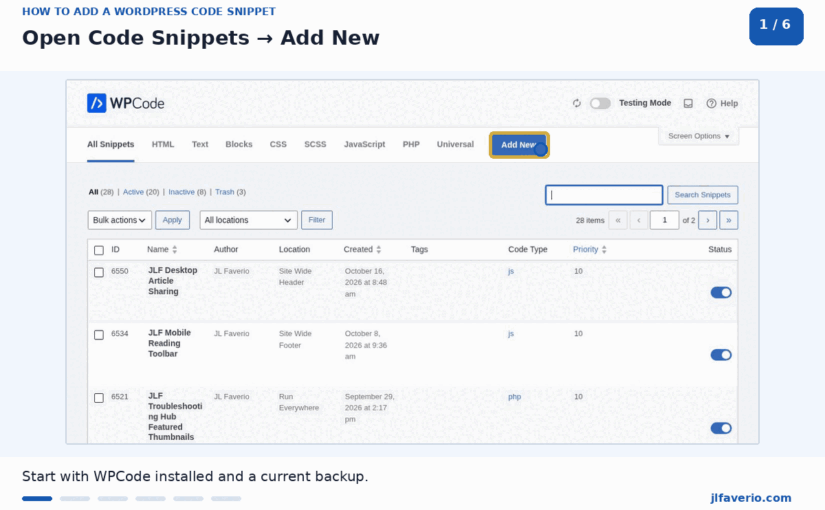
Some WordPress plugins handle a single setting. Others manage backups, security, payments, or dozens of connected features. That difference matters when you consider replacing a plugin with a code snippet. Below are 21 small WordPress tasks you can handle with...
Category: WordPress

How to Fix WordPress Stuck in Maintenance Mode
If your website displays the famous Briefly unavailable for scheduled maintenance. Check back in a minute. then chances are WordPress is performing an automatic update. The message should disappear automatically, but an interrupted update can leave the site stuck in...
How to Fix the ERR_TOO_MANY_REDIRECTS Error in WordPress
The ERR_TOO_MANY_REDIRECTS error means the browser is being sent between URLs repeatedly and never reaches the requested WordPress page. The browser eventually stops the loop and displays a redirect error. On WordPress websites, the most common causes are conflicting HTTP...
How to Fix a 500 Internal Server Error in WordPress
A 500 Internal Server Error means the server could not complete the request, but it did not provide a specific public explanation. On WordPress websites, the cause is commonly a plugin or theme conflict, damaged server rules, exhausted PHP memory,...

How to Fix the WordPress White Screen of Death
The WordPress white screen of death is a blank page with no useful error message. It usually means PHP stopped processing the request before WordPress could display the page. The most common causes are plugin or theme errors, exhausted PHP...

How to Fix WordPress Not Sending Emails
WordPress may appear to send a contact form notification, password reset, order email, or administrator alert even though the message never reaches the recipient. The problem is usually email delivery, authentication, DNS, or plugin configuration rather than the WordPress editor...
How to Fix the WordPress Memory Exhausted Error
The WordPress memory exhausted error appears when PHP needs more memory than the server allows. The message usually includes Allowed memory size exhausted followed by a file path and line number. Increasing the limit may restore the website, but the...

How to Fix a Slow WordPress Admin Dashboard
A slow WordPress admin dashboard wastes time and often signals a plugin, database, server, or background-process problem. The public website may still load quickly because page caching does not normally cache wp-admin. This is why clearing the front-end cache alone...

How to Fix a 403 Forbidden Error in WordPress
A 403 Forbidden error means the server understood the request but refused access. In WordPress, the cause is often file permissions, a security rule, a damaged .htaccess file, a plugin conflict, CDN protection, or an incorrect ownership setting. Start by...

How to Fix WordPress 404 Errors
A WordPress 404 error means the server cannot find the requested page, post, media file or other URL. Sometimes the content is genuinely missing. In many WordPress cases, however, the content still exists and the problem is caused by permalink...