

Last updated on October 22nd, 2026 at 10:53 am
ChatGPT Sites builds and hosts websites from chat instructions. It is a separate website platform, not a WordPress theme or plugin.
When I first saw Sites, my questions were pretty basic. Is this like Google Sites? Is it WordPress? Where does the website live? And who handles the hosting?
Those are the questions worth answering before getting excited about another website builder.
What is ChatGPT Sites?
Think of it as a website builder you give instructions to. Instead of starting with a blank page, you explain what visitors should see and do.
For example, you could ask for a youth baseball club website with team information, practice times, field directions, and a registration link.
The important part is describing the actual job. Build a baseball website leaves a lot open to interpretation. Help parents find the next practice and register their child gives the project a purpose.
Is it like Google Sites or WordPress?
There is some overlap, but the way you work is different.
| Platform | Basic workflow |
|---|---|
| ChatGPT Sites | Describe the website and request changes in chat. |
| Google Sites | Choose a template, edit pages, add content, and publish. |
| WordPress | Manage posts and pages, use a theme, and add features with plugins. |
Google’s setup guide walks through its editor. WordPress’s feature overview explains its publishing tools, themes, plugins, and user roles. Here, WordPress means the self-hosted WordPress.org software.
My main question would be who updates the finished website. A club volunteer adding weekly announcements needs a comfortable editing process just as much as the club needs a good homepage.
Where does the website live?
Use its chatgpt.site address or connect your own domain where supported. Buy the domain separately.
A domain is the address people type. Hosting is the service that keeps the website available. DNS tells the address where to send visitors.
For a baseball club, I would want the club to control its own domain registration. That keeps its public address under the club’s control, whichever website platform it chooses later.
Who handles the hosting?
ChatGPT Sites takes care of the hosting for the website you build there. You do not need to open a cPanel account, install WordPress, or buy a separate hosting plan just to get that Site online. The website runs on the Sites platform.
For the baseball club example, that means I could build the pages and publish them through ChatGPT. Parents would visit the website in their browser, just as they would any other club website. If the club already owns a domain, connecting it is a separate setup step. Changing where the website is hosted does not mean the club needs to move its email too.
There is still work for whoever manages the site. Practice times change, coaches leave, links break, and information gets old. Hosting keeps the website available. It does not keep the club’s schedule accurate. I would decide who handles those updates before handing over the finished site.
Sites is currently in beta on eligible paid ChatGPT plans, and usage limits apply. Before relying on it for a club or business, check the limits shown in your account. I would not describe it as unlimited hosting or promise that the current terms will stay the same.
The official OpenAI Sites documentation explains the current features and limits. Details below were checked September 21, 2026.
What else should I know?
| Feature | Simple explanation |
|---|---|
| Publishing | Saving and deploying differ. Deployment is live for the selected audience. |
| Analytics | Built-in visitor and page-view reports; unavailable for Enterprise-owned Sites. |
| Editing | Workspace collaboration is supported where available. Viewers cannot edit. |
| Saved data | D1 stores records; R2 stores files. Request persistence explicitly. |
| Storage | D1: 10 GB per Site. R2: no fixed ceiling; plan limits still apply. |
| Domain setup | Settings → Add domain → update DNS → check status. Unavailable in Enterprise at launch. |
| Deletion | Permanent; deleted Sites cannot be restored. |
For my baseball club example, I would separate three jobs: explaining the club, showing current information, and handling registrations. Write down who is responsible for each before choosing software.
What does the analytics screen show?
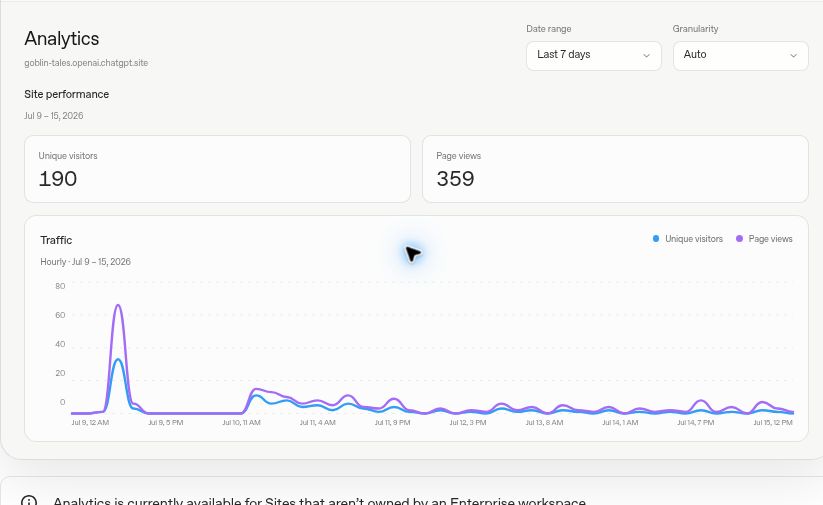
Visitors tells you about the audience. Page views tells you how much content was viewed. One person can look at several pages, so the two numbers need not match.
For a club website, I would use traffic as a starting point. The more useful questions are whether parents find the schedule and whether fewer people need to message a coach for directions. A busy website is not automatically a helpful website.
What would I ask it to build?
I would start with a small, useful website rather than request every possible feature. Here is an example prompt:
Build an informational youth baseball club website for adult parents and coaches. Include a homepage, team information, practice schedule, field directions, sponsors, and a club contact. Use our supplied logo and team colors. Make the schedule easy to read on a phone. Do not collect player records or payments. Ask for missing details instead of inventing names, dates, or locations. Save a version without deploying it so we can review the content first.
Current restrictions: Sites cannot enable financial transactions, process payment-card data or protected health information, or target under-13s or children below the applicable digital-consent age. Check the documented restrictions.
That changes how I would scope the baseball example. I would keep this project focused on information for adults, and handle enrollment decisions separately. I would not present an attractive registration mockup as a working club-management system.
Before launch, I would check three things: can a parent find practice details quickly, does the registration link work, and can the person maintaining the site update it comfortably?
Simple FAQs
Do visitors need a ChatGPT account?
Public viewing requires no workspace access; restricted access may require sign-in.
Does creating a Site make it public?
No. Initially, access is owner/admin-only.
Does hosting include a domain or business email?
Treat the website, domain registration, and email as separate decisions. Before moving anything, list what the club already uses. Do not change existing email settings just because you are changing the website.
What should I test before sharing it?
Open the website on a phone. Check the schedule, directions, navigation, and contact links. Ask someone unfamiliar with the club to find the next practice. Their experience is more useful than your opinion of the design.
Can I use my WordPress plugins?
No. ChatGPT Sites is not a WordPress installation. Do not plan around installing your existing WordPress plugins or theme there.
Will it automatically bring in Google traffic?
I would not budget around automatic traffic. A finished design still needs useful information and a reason for people to visit. For the baseball example, clear local details and accurate schedules matter more than a flashy homepage.
Would I replace my WordPress website?
I would test a small project first. If your existing WordPress website already supports your publishing, forms, and business processes, identify a specific improvement before rebuilding it elsewhere.
Which one would I choose?
For an established content website, my starting preference remains WordPress. For a simple information site, I would consider Google Sites. For a custom website idea I want to develop through conversation, I would test ChatGPT Sites.
The deciding question is simple: who will keep the website useful after launch? Choose the platform that fits that person’s work, not just the one that produces the first design fastest.
